Stepflow Timeline

$20.00

demo

Turn Your Process Into a Clear, Scroll-Driven Story

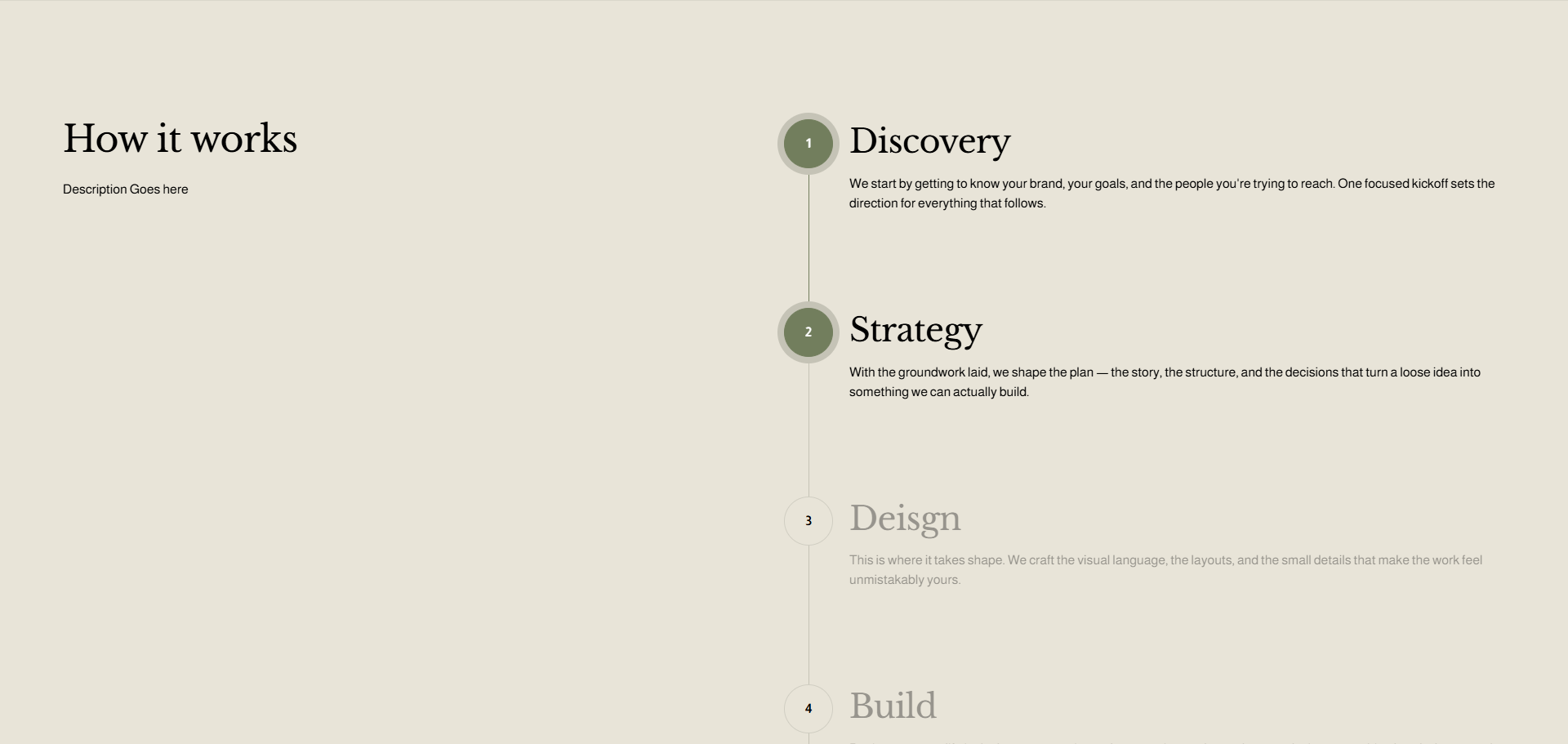
Some information deserves more than a standard list. Step Flow Timeline transforms your Squarespace content into an interactive, visually guided sequence that helps visitors understand your process one step at a time. As users scroll, the timeline progresses naturally, active steps come into focus, and each section feels connected, making services, workflows, roadmaps, and how-it-works content easier to follow and more engaging to explore.

What's Included

  • Scroll-activated timeline: The progress line advances naturally as visitors move through the section, creating a smooth visual connection between every step.

  • Interactive numbered steps: Each step features a customizable numbered dot that changes appearance as it becomes active, helping visitors instantly understand where they are in the sequence.

  • Three flexible layouts: Choose between Split Sticky, Full Width, or Alternating layouts to match different page structures and storytelling styles.

  • Sticky content experience: Keep your section heading and introduction visible while visitors scroll through the steps, creating a more focused and polished presentation.

  • Full visual customization: Control timeline colors, active states, dot size, borders, shadows, typography, spacing, content opacity, section width, and more through simple CSS variables.

  • Responsive mobile styling: Independently adjust mobile dot size, heading size, spacing, padding, and layout behavior so the experience stays clean and readable across smaller screens.

  • Smooth active-state transitions: Completed and active steps remain visually connected while upcoming content stays subtly faded, naturally directing attention through the flow.

  • Built for easy installation: Add the plugin files, choose your preferred layout, customize the provided CSS variables, and turn compatible Squarespace list sections into a polished Step Flow experience.

demo

Turn Your Process Into a Clear, Scroll-Driven Story

Some information deserves more than a standard list. Step Flow Timeline transforms your Squarespace content into an interactive, visually guided sequence that helps visitors understand your process one step at a time. As users scroll, the timeline progresses naturally, active steps come into focus, and each section feels connected, making services, workflows, roadmaps, and how-it-works content easier to follow and more engaging to explore.

What's Included

  • Scroll-activated timeline: The progress line advances naturally as visitors move through the section, creating a smooth visual connection between every step.

  • Interactive numbered steps: Each step features a customizable numbered dot that changes appearance as it becomes active, helping visitors instantly understand where they are in the sequence.

  • Three flexible layouts: Choose between Split Sticky, Full Width, or Alternating layouts to match different page structures and storytelling styles.

  • Sticky content experience: Keep your section heading and introduction visible while visitors scroll through the steps, creating a more focused and polished presentation.

  • Full visual customization: Control timeline colors, active states, dot size, borders, shadows, typography, spacing, content opacity, section width, and more through simple CSS variables.

  • Responsive mobile styling: Independently adjust mobile dot size, heading size, spacing, padding, and layout behavior so the experience stays clean and readable across smaller screens.

  • Smooth active-state transitions: Completed and active steps remain visually connected while upcoming content stays subtly faded, naturally directing attention through the flow.

  • Built for easy installation: Add the plugin files, choose your preferred layout, customize the provided CSS variables, and turn compatible Squarespace list sections into a polished Step Flow experience.

NOTE:

All plugins are digital downloads and are non-refundable under any circumstances. If you experience any issues with the plugin, I’m happy to take a look and assist where possible. For additional information, please check the FAQ page.